


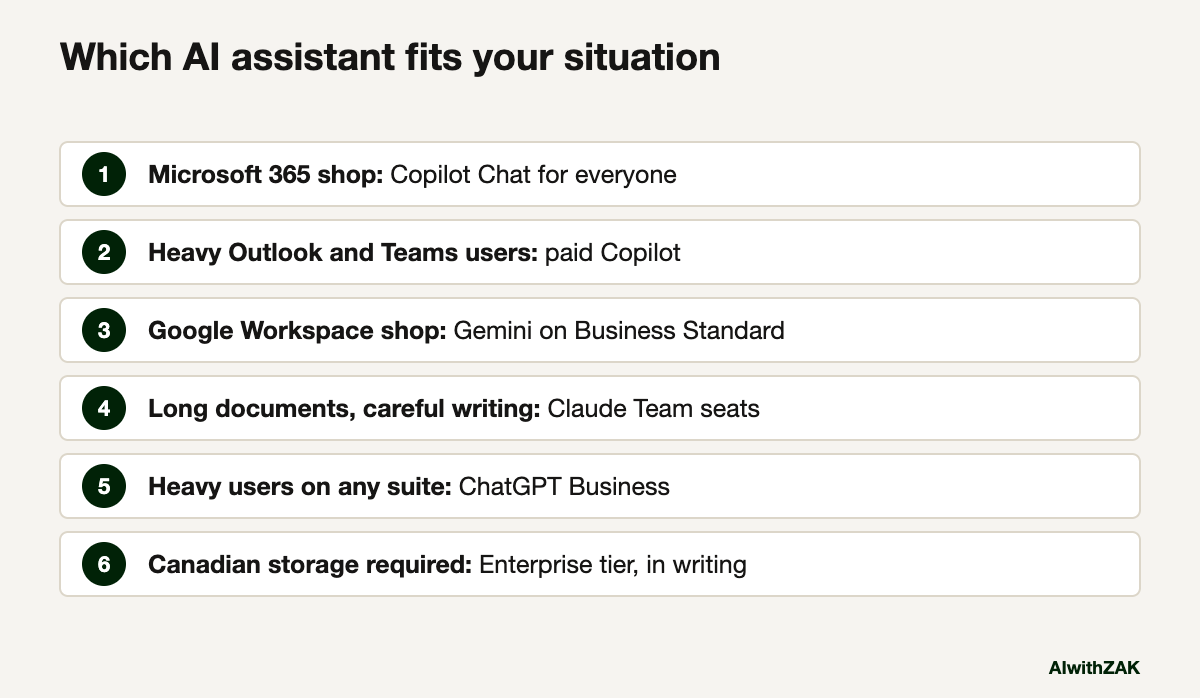
Short answer. In ChatGPT vs Claude vs Copilot vs Gemini, pick the AI tool that sits on top of the software your team already lives in. On Microsoft 365, start with Copilot Chat, which comes at no extra cost with eligible plans, and buy Microsoft 365 Copilot only for heavy users. On Google Workspace, Gemini is already inside Business Standard. Then add ChatGPT Business or Claude Team for the few people who write, analyse or build all day. All four business plans keep your content out of model training by default.
Prices checked on each vendor’s own pricing page, 23 September 2026. They change often, so check again before you buy.
For most Alberta companies, the ChatGPT vs Claude vs Copilot vs Gemini decision was made years ago by whoever picked your email provider.
That sounds glib. It isn’t. Copilot reads your Outlook, Teams and SharePoint because it lives inside them. Gemini reads your Gmail and Drive for the same reason. ChatGPT and Claude are the outsiders: often stronger for focused work, but they only see what you connect or paste in. So the useful comparison is rarely which chatbot writes the nicest paragraph. It is which one can see the work your people actually do, under terms your privacy obligations can live with.
I’m going to skip the benchmark leaderboards. They reshuffle every few weeks, the vendors each cite the tests they win, and none of them measure how a site supervisor in Grande Prairie gets a safety summary out of a 40-page PDF. What follows is prices, plan names and the trade-offs that show up in the first three months.
ChatGPT vs Claude vs Copilot vs Gemini: what are you choosing between?
You are choosing between two suite assistants and two standalone ones. Copilot and Gemini live inside Microsoft 365 and Google Workspace and see company files by default. ChatGPT and Claude are separate subscriptions that see only what you connect or paste, and heavy AI users tend to pick them.
Here are the business plans side by side, as each vendor listed them in September 2026 on the OpenAI, Anthropic, Microsoft and Google pricing pages. Microsoft and Google show Canadian dollars on their Canadian pages. OpenAI and Anthropic list US dollars.
| Tool | Business plan | Listed price, as of September 2026 | What you need first |
|---|---|---|---|
| ChatGPT | Business | US$20 per user per month billed annually, US$25 billed monthly, 2 users minimum | Nothing |
| ChatGPT | Enterprise | Custom pricing through sales | Nothing |
| Claude | Team, standard seat | US$20 per seat per month billed annually, US$25 billed monthly | Nothing |
| Claude | Team, premium seat | US$100 per seat per month billed annually, US$125 billed monthly | Nothing |
| Claude | Enterprise | US$20 per seat per month billed annually, plus usage at API rates | Nothing |
| Copilot | Copilot Chat | No additional cost | An eligible Microsoft 365 subscription |
| Copilot | Microsoft 365 Copilot Business | CAD $24.43 per user per month paid yearly (promotional, regular CAD $28.50), CAD $34.20 paid monthly | A qualifying Microsoft 365 plan |
| Copilot | Microsoft 365 Copilot (enterprise) | CAD $40.70 per user per month paid yearly | A qualifying Microsoft 365 plan |
| Gemini | Workspace Business Starter | CA$9.20 per user per month, Gemini in Gmail only | Nothing, Gemini is included |
| Gemini | Workspace Business Standard | CA$18.40 per user per month, Gemini across Docs, Sheets, Drive, Meet and more | Nothing, Gemini is included |
| Gemini | Workspace Business Plus | CA$28.70 per user per month | Nothing, Gemini is included |
Two notes on that table. Microsoft’s CAD $24.43 is a promotional rate that its page says runs through 31 December 2026. Google’s figures are the standard monthly prices on its Canadian page; it lists a 16% saving for a one-year commitment and introductory discounts for new customers.
The sticker is the smallest part of the bill. Setup, training and the hours someone spends cleaning up file permissions cost more, which is the whole argument of what an AI tool really costs after the licence.
ChatGPT vs Claude vs Copilot vs Gemini, tool by tool
Each tool wins in a different situation. Copilot fits work that lives in Outlook, Teams and SharePoint. Gemini fits Gmail and Drive shops. ChatGPT is the assistant most staff already know. Claude is the one I would hand long documents. Each has one frustration that shows up within a month.
ChatGPT Business
- Best for. Teams that want one general assistant for writing, analysis, images and research, with no dependency on which email system you run.
- What works. It is the tool most of your staff already know from home, which shortens training. The business plan comes with SAML single sign-on, usage analytics and spend controls, and OpenAI says it does not train on business data by default.
- What frustrates. It knows nothing about your company until someone connects a data source or pastes something in. If you need your data stored in Canada, OpenAI’s data residency option is offered to new Enterprise and Edu workspaces and API customers, not to the Business plan.
- Cost. US$20 per user per month on annual billing, US$25 monthly, minimum two users, as of September 2026. Enterprise is quoted by sales.
Claude Team
- Best for. People who work with long documents: contracts, tenders, policy manuals, engineering reports, anything where reading 80 pages carefully matters more than speed.
- What works. Anthropic’s current models, Claude Opus 5.5 and Claude Sonnet 5, each carry, per its models overview, a context window of one million tokens, meaning the model can hold roughly a large binder of text in mind at once. The Team plan includes single sign-on, admin controls for connectors, Microsoft 365 and Slack integrations, and no model training on your content by default.
- What frustrates. Heavy users hit usage limits on standard seats, which is why a premium seat with five times the usage exists. On Enterprise, usage is billed at API rates on top of the seat, so the monthly bill moves with how hard people work it.
- Cost. US$20 per standard seat per month billed annually, US$25 monthly. Premium seats are US$100 annually or US$125 monthly. Enterprise is US$20 per seat per month plus usage, as of September 2026.
Microsoft 365 Copilot
- Best for. Companies whose email, calendars, meetings and files already run through Microsoft 365.
- What works. The paid version draws on your work content through Microsoft Graph, so it can summarize a Teams meeting you missed or draft a reply using the thread and the attached spreadsheet. Microsoft’s enterprise data protection applies, and prompts and responses are not used to train foundation models. Under Microsoft’s Anthropic subprocessor terms, Anthropic’s Claude models are also available inside Copilot and Researcher, switched on by default for most commercial customers outside the EU and UK.
- What frustrates. Copilot respects your existing SharePoint and Teams permissions, which means it also respects your bad ones. If a salary spreadsheet has been shared with the whole company since 2019, Copilot will find it for anyone who asks. Fix permissions before the rollout.
- Cost. Copilot Chat at no additional cost with an eligible plan. Microsoft 365 Copilot Business at CAD $24.43 per user per month paid yearly on promotion, CAD $34.20 monthly. The enterprise version is CAD $40.70 paid yearly, as of September 2026.
Gemini in Google Workspace
- Best for. Companies already on Gmail and Google Drive, especially smaller firms that want AI without a second invoice.
- What works. Gemini is bundled into the plan price. Business Standard and above include Gemini in Docs, Sheets, Slides, Drive, Meet and Chat, the Gemini app with expanded model access, Gemini Notebook for research on your own sources, and Workspace Studio for building simple AI agents. Google’s Workspace privacy hub says your content is not human reviewed or used to train models outside your domain without permission.
- What frustrates. Business Starter gets Gemini in Gmail and little else, so the cheapest plan is a false economy if you want AI in documents. The Business plans also cap out at 300 users.
- Cost. CA$9.20, CA$18.40 and CA$28.70 per user per month for Starter, Standard and Plus on monthly billing, as of September 2026, with a 16% saving listed for an annual commitment. Enterprise is quoted by sales.
A note on model names. OpenAI’s ChatGPT plans page now lists GPT-6 models on its paid plans, Anthropic lists Opus 5.5 and Sonnet 5 as current, and Google’s Gemini release notes introduced Gemini 3.6 Flash in July 2026. By the time you read this, at least one of those will have changed. Choose the plan and the data terms; the model underneath will be swapped several times during your contract.
Which AI tool should you pick if you run Microsoft 365?
Turn on Copilot Chat for everyone first, because it costs nothing extra with an eligible plan and runs under Microsoft’s enterprise data protection. Buy paid Microsoft 365 Copilot licences only for the people whose days are full of meetings, email and documents, and measure them for a quarter.
Microsoft’s pricing makes this easy to stage. The free tier gives staff a sanctioned place to type, which does more to shrink shadow AI in your company than any memo. The paid licence adds the part that reads your mail, meetings and files. That second part is where the value sits, and it is also where a messy SharePoint turns into a privacy incident.
I would not buy paid Copilot for a whole company in year one. Start with the office and project people who spend most of their day in Outlook and Teams, give them a few weeks of real training, and check usage in the admin centre before you renew.
One setting to look at on day one: the Anthropic models toggle under Copilot settings in the Microsoft 365 admin centre. For a Canadian tenant it is on by default. That may be fine for you. Make it a choice rather than a surprise, especially if your clients’ contracts name approved subprocessors.
Which one fits a company on Google Workspace?
If you’re on Business Standard or higher, you already pay for Gemini, so use it before buying anything else. Gemini covers drafting, meeting notes and searching Drive for most staff. Add a standalone tool only for the handful of people who need deeper analysis or longer documents.
The common mistake here runs the other way. A company on Workspace buys ChatGPT seats for everyone, then discovers most staff only needed help with email and meeting notes that Gemini was already doing inside Gmail and Meet. Check your plan level first. If you’re on Starter, moving up to Standard is usually cheaper than a separate AI subscription for every seat, and it brings the rest of the Gemini features with it.
Illustrative example, not a client case study. Picture a 25-person agricultural equipment dealer outside Lethbridge on Business Standard. The parts desk uses Gemini in Gmail to draft replies to supplier emails. The owner uses Gemini Notebook on a folder of manufacturer warranty bulletins. One person in finance gets a Claude Team seat to read lender agreements and year-end packages. Total new spend: one seat.
Is it worth paying for two AI tools?
For most mid-sized companies, yes, as long as the second tool goes only to the people who will use it daily. The suite assistant covers everyone’s email and meetings. A standalone assistant such as ChatGPT or Claude serves the heavy users, usually a small, named group of staff.
This is where the ChatGPT vs Claude vs Copilot question can have two answers, and where people who know the field disagree. One camp says standardize on a single tool: one contract, one policy, one training program, one set of data terms to check. The other says the suite assistants are weaker for focused analytical work, so heavy users will go around you and use personal accounts anyway.
If the first camp is right for you, because you’re under about 30 staff or your data is sensitive, pick the suite tool and write down what it may and may not touch. If the second camp is right, because you have analysts, estimators or writers who live in AI all day, buy the standalone tool for them by name and review it after 90 days. Either way, the approved list goes in writing, it names the plan and not only the brand, and personal accounts are off the table for company data. The AI governance checklist covers how to write that down, and is ChatGPT safe for company data covers why the plan matters more than the brand.
Buying tools is the easy step. Getting people to change how they work with them is where most of the return is won or lost, and it is why I push training for business teams ahead of a second licence. If you want the return measured, measuring AI ROI in a small business is the method, and the questions to ask an AI vendor before you sign apply to these four as much as to anyone.
Paste this into your AI. Use it in whichever assistant you already have to get a first answer for your own company.
I run a [number]-person [industry] company in Alberta. Our email and files are on [Microsoft 365 / Google Workspace, and which plan]. About [number] staff spend most of their day writing, analysing documents or in meetings. Our most sensitive data is. Compare Microsoft 365 Copilot, Gemini in Workspace, ChatGPT Business and Claude Team for us. Tell me which one tool every employee should get, which (if any) second tool a small group should get and who, what data each tool would be able to see, and three things I must check in the vendor's data terms before buying. Flag anything you are unsure of rather than guessing, and remind me to check current prices on the vendor's site.![client]()
My position is simple. Start with the assistant built into the suite you already pay for, give a standalone tool to the named people who will use it every day, and decide the rest after a quarter of real usage data.
Questions people ask
It depends on where your work lives. Microsoft 365 Copilot reads your Outlook, Teams and SharePoint content, so it is the better fit for companies already on Microsoft 365. ChatGPT Business is a stronger general assistant that works regardless of your email system, but it only sees company data you connect or paste in. Many firms use Copilot Chat for everyone and ChatGPT for a few heavy users.
OpenAI lists ChatGPT Business at US$20 per user per month billed annually or US$25 billed monthly, with a minimum of two users, as of September 2026. Prices are shown in US dollars, so the Canadian cost moves with the exchange rate. ChatGPT Enterprise uses custom pricing through OpenAI’s sales team.
Yes. As of September 2026 Google’s Canadian pricing page shows Gemini in every Business plan. Business Starter includes Gemini in Gmail and basic access to the Gemini app. Business Standard and Plus add Gemini in Docs, Sheets, Slides, Drive, Meet and Chat, expanded Gemini app access and Gemini Notebook. There is no separate Gemini add-on needed for those features.
Microsoft says Copilot Chat is available at no additional cost for users with eligible Microsoft 365 subscriptions, and it runs under Microsoft’s enterprise data protection. It works with web information and files you upload. The paid Microsoft 365 Copilot licence adds the ability to work across your mail, meetings and files through Microsoft Graph.
Not on their business plans by default. OpenAI says it does not train on ChatGPT Business or Enterprise data by default, Anthropic says the same for Claude Team and Enterprise, Microsoft says Copilot prompts and responses are not used to train foundation models, and Google says Workspace content is not used to train models outside your domain without permission. Consumer plans follow different rules.
Sometimes, depending on the plan. OpenAI lists Canada as a data residency region for new ChatGPT Enterprise and Edu workspaces and eligible API customers, but not for ChatGPT Business. Other vendors offer regional options mainly on enterprise tiers. If Canadian storage is a contractual or regulatory requirement, confirm it in writing with the vendor before signing.
There is no stable answer. OpenAI, Anthropic and Google each release new models every few months and each cites the benchmarks it leads. For a business, the plan’s data terms, admin controls and fit with your existing software matter more than which model tops a leaderboard this month, because the model under your subscription will change during the contract.