

Short answer. Alberta’s AI note taker privacy rules usually let you record, if you tell people before it starts. Under the Criminal Code, a participant can consent to recording a conversation they are part of, so switching on a note-taker in your own meeting is not an interception offence. Alberta’s PIPA, and PIPEDA for cross-border commercial activity, require notice of the purpose and, for clients and other outsiders, consent. Staff can be recorded for reasonable work purposes with notice. The risky cases are bots that join meetings on their own.
Law, guidance and vendor settings verified 23 September 2026. Not legal advice.
On 15 August 2025, a man named Justin Brewer filed a proposed class action against Otter.ai in the federal court for the Northern District of California, and AI note taker privacy became a courtroom question. The complaint alleges that Otter’s note-taker recorded and accessed conversations of people who never signed up for Otter or agreed to be recorded, and used that material to train its AI without telling them.
It’s an American case under American law, and nothing in it has been proven.
It still matters to an owner in Lethbridge or Edmonton, because it put a name on a gap that’s easy to miss. The person who invited the bot agreed to everything in the terms of service. The client on the other end of the call agreed to nothing. Alberta law cares about both of them.
AI note-takers are some of the easiest AI tools to justify. Nobody misses writing minutes. That’s also why they spread without anyone deciding they should, which makes them a textbook case of shadow AI in your company.
What AI note taker privacy rules apply in Alberta?
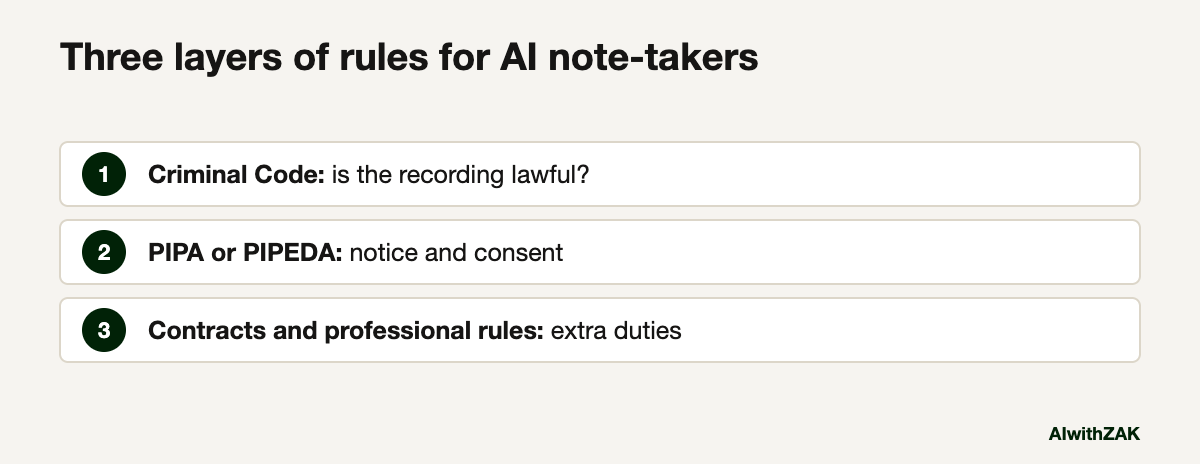
Three layers apply. The Criminal Code decides if the recording itself is lawful. Privacy law, meaning Alberta’s PIPA or the federal PIPEDA, decides what notice and consent you need to collect and use what was said. Your contracts and professional rules can add obligations on top of both.
A lot of confusion comes from treating the first layer as the whole answer. People hear that Canada is a one-party consent country and stop there. One-party consent only answers the criminal question. It says nothing about your duties to the people whose words, names and opinions end up in a transcript stored on a vendor’s servers.
A meeting transcript is full of personal information, meaning information about an identifiable individual. Names, voices, opinions about staff, a client’s financial position, a job candidate’s answers. Once an AI tool records and summarizes it, your company has collected that information, and privacy law applies to the collection, the use, the storage and any disclosure to the vendor.
Is it legal to record a meeting in Alberta without telling everyone?
Under criminal law, generally yes if you are a participant. Section 184 of the Criminal Code makes it an offence to knowingly intercept a private communication, but exempts anyone with consent from the speaker or the intended recipient. Privacy law is a separate, stricter test.
The exemption in section 184(2)(a) covers a person who has the consent, express or implied, “of the originator of the private communication or of the person intended by the originator thereof to receive it.” A private communication, in plain terms, is one where the speaker reasonably expects nobody else is listening in. If you are in the meeting and you turn on a note-taker, your consent covers the recording as far as the Criminal Code goes.
The grey zone is the bot that goes to meetings without its owner. Otter can join the meetings on your calendar automatically, and Zoom can start an AI summary as soon as anyone starts the meeting, with or without the host there. I wouldn’t want to be the test case for how section 184 treats a bot recording a call its owner skipped. Turn auto-join off and the question disappears.
Now the stricter layer.
Do you need consent to use an AI note-taker with clients?
Yes, in practice. PIPA requires consent to collect personal information, plus notice of the purpose and a contact for questions. Consent can be express, deemed or opt-out, but people need a reasonable chance to decline. Announcing the note-taker and offering to turn it off meets that bar.
The Government of Alberta’s summary of PIPA’s collection rules sets out the three forms of consent. Deemed consent applies when someone voluntarily provides information for a purpose where doing so is reasonable. Opt-out consent applies when a person receives clear, understandable notice and a reasonable opportunity to decline, and doesn’t. Your notice has to say what you’re collecting and why, and name a person who can answer questions.
One more PIPA rule is easy to miss. If a service provider outside Canada will handle the information, PIPA requires you to tell people how to access your policies on that provider and who can answer questions about it. Otter, Zoom and Microsoft are all American companies. Check where yours stores data, and read what data residency means for Canadian businesses if the answer matters to your clients.
Where PIPEDA applies, the federal privacy commissioner’s guidelines for obtaining meaningful consent say express consent is generally required when the information is sensitive, when the use falls outside what people would reasonably expect, or when it creates a meaningful risk of significant harm. A recorded conversation about someone’s health, money or legal trouble can tick all three.
Staff meetings are different. PIPA lets an employer collect personal employee information without consent when it is reasonable and for the purpose of managing the employment relationship, as long as current employees get reasonable notice first. Recording a weekly operations meeting for minutes likely fits. Recording one-on-ones about performance deserves more thought, and a conversation with HR or counsel.
PIPA or PIPEDA, and which rule covers which meeting
For most Alberta businesses, PIPA covers meetings with Alberta staff and clients. PIPEDA applies when personal information crosses provincial or national borders for commercial purposes, and to federally regulated businesses such as banks and interprovincial trucking. Health custodians have extra duties under the Health Information Act.
| Meeting | Main privacy law | What it asks of you |
|---|---|---|
| Internal staff meeting, Alberta company | PIPA, personal employee information rules | Reasonable purpose, notice to staff before recording |
| Call with an Alberta client or supplier | PIPA | Notice of purpose, a contact person, a real chance to decline |
| Call with a client in another province or country, for business | PIPEDA for that transaction | Meaningful consent, express where the content is sensitive |
| Federally regulated business, such as interprovincial trucking | PIPEDA | Meaningful consent throughout |
| Clinic visit or patient call, health custodian | Health Information Act | A privacy impact assessment submitted to the OIPC before using an AI scribe |
The federal commissioner’s questions and answers on PIPEDA and Alberta’s PIPA explain the split. Clinics should read the Alberta OIPC’s September 2025 guidance on AI scribes before anything else, and AI for Alberta clinics under the Health Information Act covers the rest.
What should you say before the AI note-taker starts?
Say it twice: once in the calendar invite and once out loud before recording starts. Name the tool, say what it records, why, who gets the notes, how long you keep them, and that you will turn it off if anyone asks. Then actually turn it off when someone asks.
A line for the invite:
“We use [tool] to record and summarize this meeting so nobody has to take notes. The summary goes to attendees from [company] and is deleted after [period]. Tell us if you’d prefer we don’t record, and we won’t. Questions to [name, role].”
And at the start of the call: “Before we start, I’ve got [tool] taking notes. It records audio and gives us a summary afterwards. Are you all right with that? Happy to switch it off.”
Keep the off switch real. If a client says no and you record anyway on another device, you have a much bigger problem than a missing summary.
This belongs in writing. Clause 7 of the AI acceptable use policy template tells staff to announce recording before it starts, and the AI governance checklist is where the retention period gets decided.
Which AI note taker privacy settings should you change?
Turn off automatic joining, limit who receives summaries to your own staff, set a retention period, and switch on any participant consent prompt your platform offers. Zoom, Teams and Otter all offer these controls. Check each default yourself instead of trusting what the installer picked.
| Tool | Setting | What to choose |
|---|---|---|
| Zoom AI Companion meeting summary | Auto-start, and who receives summaries | Auto-start off unless you need it. Send summaries to hosts or internal invitees only. Admins can restrict sharing and lock the setting |
| Microsoft Teams with Copilot | Meeting options, Copilot and other AI | Choose “Only during the meeting” for sensitive calls, so Copilot works without a recording or transcript being saved |
| Microsoft Teams, admin | Participant agreement for recording and transcription | Turn it on. Participants are muted until they agree to be recorded, and anyone who says no gets a view-only experience |
| Otter.ai | Default auto-join settings | “Meetings I manually select” |
| Otter.ai | Default audience for shared notes | “Don’t share” or internal guests only |
Two warnings on the vendor side. Microsoft notes that Copilot prompts and responses can still be kept for compliance under your organization’s retention policies, even when nothing is recorded. And Otter’s help centre article on auto-join notes that calendar events you adjusted individually keep their own settings after you change the default, so check the next few weeks of meetings after you flip the switch.
Then deal with the transcript. PIPA’s duties for organizations include reasonable security, keeping personal information only as long as it is reasonably needed, and reporting any breach with a real risk of significant harm to the OIPC. A folder of two years of recorded client calls, sitting in a vendor account an ex-employee still has access to, fails all three. Pick a retention period, delete on schedule, and remove access the day someone leaves.
Last, read what the vendor does with your recordings. If the terms let it train its models on your meetings, turn that off or choose a different tool. The guide to company data in ChatGPT covers the same question for chat tools, and the overview of AI regulation for Alberta businesses maps the wider rules.
The Otter lawsuit will take years to resolve. Your side of AI note taker privacy takes one sentence at the top of each call and fifteen minutes in the admin settings.
Questions people ask
Generally yes, with notice. The Criminal Code allows a participant to consent to recording a conversation they are part of. Alberta’s PIPA then requires notice of the purpose and consent from clients and other outsiders, with a reasonable chance to decline. Employees can be recorded for reasonable work purposes after notice. This is general information, not legal advice.
For criminal law purposes, yes. Section 184 of the Criminal Code exempts interceptions made with the consent of either the person speaking or the intended recipient, so a participant can lawfully record. Privacy laws such as PIPA and PIPEDA still apply to the personal information collected, and they usually require notice and consent.
You should. Under Alberta’s PIPA, collecting personal information requires consent and notice of the purpose, including who can answer questions. Telling clients before the meeting, and offering to switch the tool off, is the simplest way to meet that standard. Where PIPEDA applies and the conversation is sensitive, express consent is generally expected.
Alberta’s PIPA allows employers to collect personal employee information without consent when it is reasonable and for managing the employment relationship, provided current employees get reasonable notice beforehand. Routine operations meetings usually fit. Performance or disciplinary conversations deserve more care and advice from HR or counsel before recording.
For most Alberta businesses, PIPA covers activity within Alberta. PIPEDA applies to personal information crossing provincial or national borders in commercial activity, and to federally regulated businesses such as banks, airlines and interprovincial trucking. A call with a client in another province can fall under PIPEDA for that transaction.
In Otter, open the AI Notetaker settings from the Meetings tab, or go to Integrations and the default auto-join settings, and choose Meetings I manually select. Calendar events you adjusted individually keep their own setting, so review upcoming meetings afterwards. Also set the default audience for shared notes to keep summaries private or internal.
Yes, with extra steps. Under Alberta’s Health Information Act, custodians must submit a privacy impact assessment to the Office of the Information and Privacy Commissioner before using an AI scribe. The OIPC published guidance for AI scribe privacy impact assessments in September 2025 to help custodians prepare one.