


Short answer. AI agent permissions should follow least privilege: the agent gets the smallest set of access rights that completes one defined task, under its own identity, never a person’s password. Write its rules in three lists. Always do covers low-risk reading and drafting. Ask first covers anything that sends, pays, deletes or changes a record. Never do covers credentials, money movement and systems outside the task. Log every action and name who can switch it off.
Security guidance and vendor documentation verified 23 September 2026.
Illustrative example, not a client case study. A Red Deer HVAC company sets its AI agent permissions the fast way: it connects the agent to the office administrator’s Microsoft 365 account so it can sort service requests. The agent now has everything she has: every inbox folder, the shared drive with payroll on it, and the ability to send email as her. A message arrives from what looks like a supplier. Buried in it is a line of text telling the agent to forward the last month of invoices to a new address. The agent does it, because it can, and nothing told it to stop and ask.
Nobody broke in. The agent had permission.
That trick has a name, prompt injection, meaning instructions hidden inside content the agent reads, such as an email, a web page or a PDF. You can’t fully prevent an agent from reading a malicious instruction. You can decide in advance what it’s able to do after it reads one, and that decision is the whole subject of this page.
The security community has settled on the language. OWASP, the non-profit open-source security project, calls the failure excessive agency and traces it to three causes: too much functionality, too many permissions and too much autonomy. Every rule below attacks one of those three.
What AI agent permissions should a business allow?
Give an agent the minimum access that finishes one defined task, under its own login, with every action logged. Reading and drafting are cheap to get wrong. Sending, paying, deleting and changing records are expensive, so those wait for a person’s approval or stay off the table entirely.
NIST, the United States standards body, defines least privilege as restricting access “to the minimum necessary to accomplish assigned tasks.” The principle long predates AI. What’s new is the thing receiving the access: software that decides its next step by reading text, some of which was written by strangers.
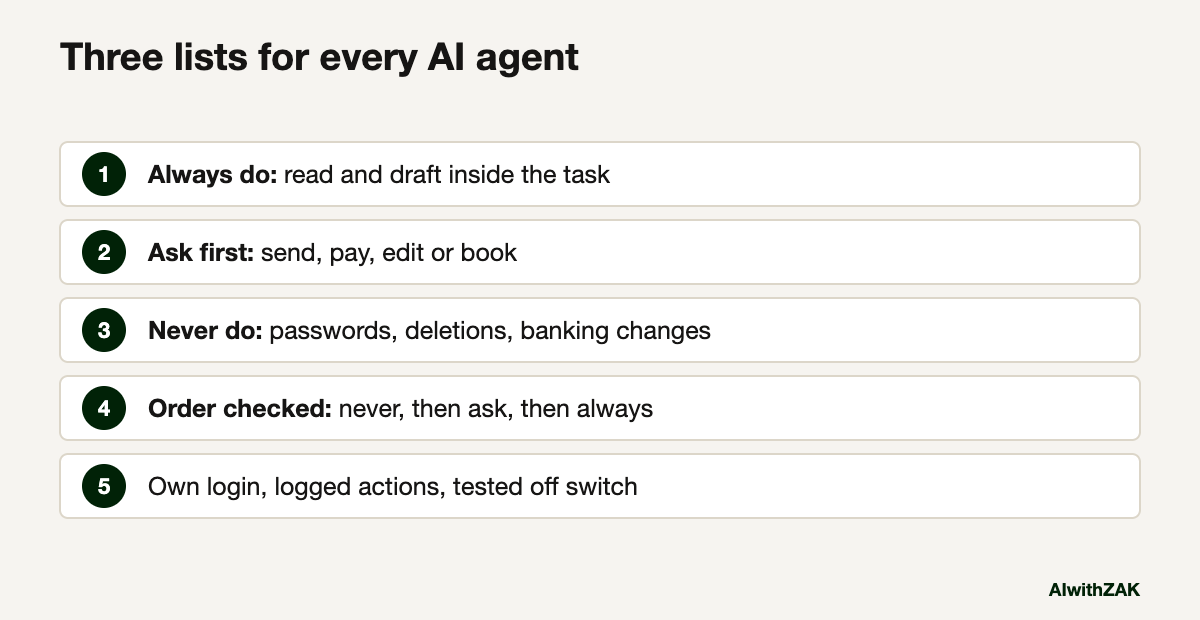
The practical version is three lists. I use the labels always do, ask first and never do, because anyone in the business can read them and argue with them, which is the point.
Anthropic’s documentation for its Claude Code agent uses the same three buckets, called allow, ask and deny, and states the order they’re checked in: deny, then ask, then allow. An allow rule can’t carve an exception out of a deny rule. Copy that order into your own rules. When two lists disagree, the never list wins.
AI agent permissions in three lists: always do, ask first, never do
Sort every action the agent could take into three lists before it goes live. Always do is reading and drafting inside the task. Ask first is anything that leaves the building, moves money or changes a record. Never do is credentials, permissions, deletions and systems outside the task.
Here is a starting set for an agent that handles a shared service inbox, the kind of job covered in customer service automation that works. Change the rows to fit your agent. Keep the columns.
| Area | Always do | Ask first | Never do |
|---|---|---|---|
| Read the service inbox, label and sort, draft replies | Send any reply, forward anything outside the company | Read other mailboxes, change forwarding rules, send as a named person | |
| Files | Read the service folder, create new drafts | Overwrite or move an existing file | Open payroll, HR or finance folders, delete anything |
| Customer records | Look up a customer, read job history | Create or edit a record, book or change an appointment | Export lists, merge or delete records |
| Money | Read an invoice total to answer a question | Draft an invoice or credit for review | Pay, refund, change banking details, approve anything |
| Access | Use the tools it was given | Request a new tool or connection | Handle passwords, create accounts, change its own permissions |
Two rows deserve extra attention. Changing banking details and changing forwarding rules are exactly the moves an invoice fraud needs, so they belong on the never list for every agent, whatever its job.
The ask-first column is where experts split. One camp says every consequential action needs a human click. The other says a queue of approvals trains people to click yes without reading, which is worse than no approval at all. Both have a point. If the first camp is right for you, keep the ask-first list broad and staff it properly. If the second is, shrink the list until each request is rare enough to read. Either way, an approval nobody reads is a fault in the list, and you fix the list.
Paste this into your AI. Use it to draft a first rule set for an agent you are planning, then argue with the result.
I'm planning an AI agent for my business. Its one job: [describe the task].
It will connect to: [list systems, e.g. shared inbox, scheduling software, shared drive].
Write its rules as three lists: ALWAYS DO, ASK FIRST, NEVER DO.
Rules for your draft:
1. Anything that sends, pays, deletes, exports or changes a record goes in ASK FIRST or NEVER DO.
2. Changing banking details, forwarding rules, passwords or its own permissions goes in NEVER DO.
3. For each system, name the narrowest access level that still does the job.
4. List what should be logged, and who should be able to switch the agent off.
Flag anything in my description that sounds broader than the one job.
Should an AI agent use my login?
No. An agent should have its own identity, with its own permissions and its own entry in the logs, so you can separate its actions from a person’s. Sharing a login gives the agent everything that person can reach and blurs who did what.
Microsoft built a product around this. Microsoft Entra Agent ID gives agents their own identity accounts, and Microsoft’s documentation says every query the agent makes is recorded as having been done by an AI agent. For agents built in Copilot Studio, it records the person who created the agent as its sponsor, which answers the first question anyone asks after something goes wrong: whose is this?
You don’t need enterprise software to follow the principle, and a named, separate account also stops an agent from becoming another piece of shadow AI in your company. For a small business it can be a dedicated account such as [email protected], with access to one mailbox and one folder, owned by a named person.
Passwords are the hard line. OpenAI’s agent in ChatGPT, for example, pauses when a site needs a login and asks the person to take over the browser; OpenAI says screenshots aren’t captured during takeover. My view is blunter than most vendors’: if a setup screen asks you to type your own password into an agent, stop and find another way to connect it.
What should you log when an AI agent acts?
Log what the agent was asked, which tools it called, what it decided and what it actually did, with timestamps. Keep the logs somewhere the agent can’t edit. Then have a named person read a sample every week and hold the power to switch the agent off within minutes.
Canada’s Cyber Centre published joint guidance on adopting agentic AI in May 2026 with the cyber agencies of the United States, the United Kingdom, Australia and New Zealand. It calls for comprehensive logs and real-time monitoring covering prompts, tool calls, memory, decisions and actions. It also says agents shouldn’t carry out high-impact actions without prior human approval.
For a mid-sized Alberta company, the weekly review can be fifteen minutes on a Friday. Pull ten actions at random. Check each one against the three lists. Anything surprising goes to the agent’s owner that day.
Know how to stop it before you start it. Write down who can revoke the agent’s access and how, and test it once.
How much autonomy should an agent get at the start?
Start with read and draft only, and let the agent earn each step up. Move one action from ask first to always do only after the logs show it doing that action correctly for weeks. Treat autonomy as a promotion that needs evidence behind it.
The Cyber Centre guidance recommends phased deployment with access and autonomy that increase over time. OWASP’s agentic project, whose Top 10 for Agentic Applications came out in December 2025, puts identity and privilege abuse third on its list and describes the principle as least agency, meaning autonomy has to be earned.
A sensible sequence for most agents runs like this.
- Week one. Read and draft. A person sends everything.
- After a clean run. The agent sends routine replies from an approved list of templates. Everything else still waits.
- Later, with evidence. It books and changes appointments on its own, with a daily summary to its owner. Money and deletions never move off the never list.
If you’re not sure a task needs an agent at all, the difference between agents and plain automation is worth ten minutes first. A fixed automation that can only do one thing has no permissions problem to speak of.
A checklist before any agent gets access
Before AI agent permissions go live, confirm eight things in writing: its one task, its own identity, the narrowest access per system, the three lists, logging, a named owner, a tested off switch, and a review date. If any line is blank, the agent isn’t ready.
- One task, written in a sentence a new hire would understand.
- Its own account or agent identity, never a staff member’s login.
- For each connected system, the lowest access level that still works. Read-only wherever possible.
- Always do, ask first and never do lists, signed off by the person whose area it touches.
- Logs of prompts, tool calls and actions, stored where the agent can’t change them.
- A named owner who reads a sample of the logs weekly.
- An off switch someone has tested.
- A date, thirty days out, to decide what moves between lists.
Most of this also belongs in your written rules for staff. Clause 8 of the AI acceptable use policy template says no connections without approval, and this checklist is what that approval should look like. Once the agent is live, how to tell if an AI agent is working covers the measurement side, and the questions to ask an AI vendor covers the agents you buy.
An agent with a short never list and your office administrator’s password is a bigger risk than the fraud email it will eventually read.
Questions people ask
Only the permissions needed for one defined task, under its own identity. Reading and drafting inside that task can be allowed. Sending, paying, deleting, exporting or changing records should need a person’s approval. Handling passwords, changing banking details and changing its own permissions should be off limits entirely. Every action should be logged.
Least privilege is the security principle that any user or process gets only the minimum access needed for its assigned task. Applied to AI agents, it means narrow access to specific mailboxes, folders and records, read-only wherever possible, and no standing access to finance, HR or administrator functions the task does not need.
No. Give the agent its own account or agent identity with limited access, so its actions show up separately in logs and can be switched off without locking you out. Some agents, including ChatGPT’s agent mode, pause at login screens so the person enters credentials directly. Sharing a personal password gives the agent everything you can reach.
Excessive agency is OWASP’s term for an AI system that can take damaging actions because it has too much functionality, too many permissions or too much autonomy. It matters because an agent can be misled by bad or manipulated input, and its permissions decide how much harm follows from that mistake.
Prompt injection is when instructions are hidden inside content an AI system reads, such as an email, web page or document, and the system follows them as if they came from its user. It cannot be fully prevented, so the practical defence is limiting what the agent is able to do after reading one.
Yes. In May 2026 the Canadian Centre for Cyber Security published joint guidance on the careful adoption of agentic AI with agencies from the United States, United Kingdom, Australia and New Zealand. It recommends minimum privileges, human approval for high-impact actions, detailed logging and monitoring, and phased rollout with gradually increasing autonomy.