


Short answer. AI total cost of ownership is the licence plus everything it takes to make the licence useful: usage charges, setup and data cleanup, training time, someone to own it, security and privacy review, retesting when the model changes, and the cost of leaving. For a typical per-seat business tool, the licence is often less than half of the first-year cost once staff time is counted. Budget for the people time first, then the seats.
Prices verified on vendor pricing pages 23 September 2026. Worked example is illustrative.
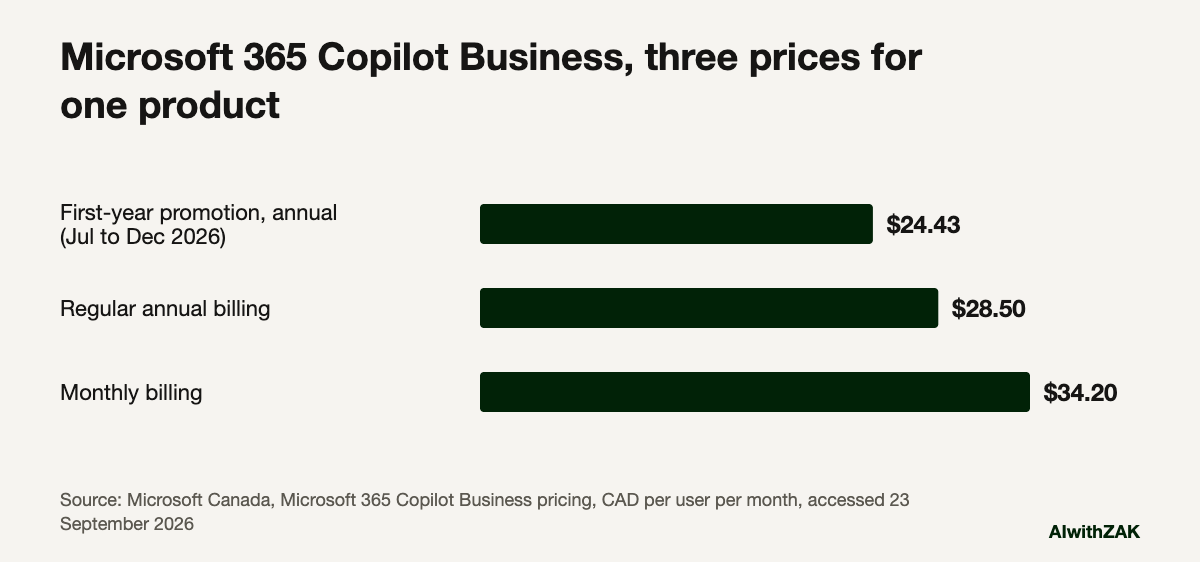
Microsoft’s Canadian pricing page lists Microsoft 365 Copilot Business at $24.43 CAD per user per month this fall, paid yearly. It is the first number anyone reaches for when working out AI total cost of ownership, and the least reliable.
Read the small print and that number has an expiry date. It is a first-year promotion for annual commitments bought between 1 July and 31 December 2026. The regular annual price is $28.50 CAD. Pay monthly instead and it is $34.20 CAD. Same product, three prices, and none of them is what the tool will cost you.
That is the pattern with nearly every AI purchase an Alberta business makes in 2026. The seat price is easy to find, easy to compare and easy to get approved. The rest of the cost arrives as staff hours, IT tickets and a second invoice for usage, spread across budget lines nobody adds up.
Analysts have been flagging it for two years. Gartner predicted in July 2024 that at least 30% of generative AI projects would be abandoned after proof of concept by the end of 2025, and named escalating costs among the reasons. In June 2025 it predicted that over 40% of agentic AI projects will be cancelled by the end of 2027, again citing escalating costs. One Gartner analyst put it plainly: costs for generative AI “aren’t as predictable as other technologies.”
What goes into AI total cost of ownership?
AI total cost of ownership covers the licence, usage charges, setup and integration, data and permission cleanup, training time, an internal owner’s time, privacy review, retesting when the vendor changes models, and exit costs. Staff time is often the largest item, and it rarely appears on the purchase request.
| Cost line | What it covers | Where it hides |
|---|---|---|
| Licences | Per-seat fees, base plans the AI add-on requires | Promotions that end, monthly vs annual pricing, USD billing |
| Usage | Tokens, credits, actions, agent runs | Grows with adoption, often on a separate invoice |
| Setup and integration | Connecting to email, files, CRM, ERP; single sign-on | IT time or a contractor’s hours |
| Data and permission cleanup | Fixing who can see what before AI can search it | Discovered after rollout, usually by accident |
| Training | Hours per person to learn the tool on real work | Counted as zero because nobody bills it |
| Ownership | Someone who fields questions, tracks use, renews | Added to a busy person’s week with no time removed |
| Governance and review | Privacy review, policy updates, client contract checks | Legal or compliance hours, often external |
| Model changes | Retesting prompts and workflows when the vendor updates | Unplanned, recurring |
| Exit | Exporting data, rebuilding workflows elsewhere | Only visible when you try to leave |
Two of these deserve a closer look, because they catch Alberta companies most often.
Usage charges. A growing share of business AI is priced partly on consumption. Anthropic’s Claude Enterprise plan lists a seat price of $20 USD per seat per month billed annually, plus usage at API rates. Microsoft sells Copilot Studio, its tool for building custom agents, in packs of 25,000 credits for $200 USD per pack per month. Nothing is hidden. It is simply a cost that grows with success, which is exactly when nobody is watching the invoice.
Permission cleanup. Microsoft’s own documentation says Copilot only surfaces organizational data that each user already has at least view access to, and tells customers to use SharePoint’s permission models to control who sees what. In plain terms: if your shared drives have been “everyone can open everything” since 2015, an AI assistant will find the salary spreadsheet faster than any employee ever did. Fixing that is real work, and it belongs in the budget.
How much do business AI licences cost per user in 2026?
Standard business AI seats sit around $20 to $35 per user per month as of September 2026, depending on vendor, currency and billing term. Microsoft lists Copilot Business in Canadian dollars. OpenAI and Anthropic list their business plans in US dollars, so Alberta buyers also carry exchange-rate risk on renewal.
| Plan | Annual billing | Monthly billing | Currency |
|---|---|---|---|
| Microsoft 365 Copilot Business (add-on) | $28.50 per user per month ($24.43 first-year promotion, July to December 2026) | $34.20 | CAD |
| ChatGPT Business | $20 per user per month | $25 | USD |
| Claude Team, standard seat | $20 per seat per month | $25 | USD |
| Claude Team, premium seat | $100 per seat per month | $125 | USD |
| Claude Enterprise | $20 per seat per month plus usage at API rates | Annual only | USD |
All prices as listed on each vendor’s pricing page as of September 2026, before tax. ChatGPT Business requires at least two users. Copilot Business is sold as an add-on, so it sits on top of a Microsoft 365 business plan you are already paying for.
For the side-by-side on what each tool is actually good at, see ChatGPT, Claude, Copilot or Gemini for an Alberta business. The chart below puts Microsoft’s three Copilot prices side by side.
A worked example for a 40-person firm
In this illustrative example, a 40-person firm buying Copilot Business at the regular annual price spends about $13,700 on licences and about $34,400 in total in year one. The licence is roughly 40% of that. Every figure except the licence price is an assumption you should replace with your own.
Illustrative example, not a client case study. Picture a 40-person engineering and project services firm with offices in Edmonton and Nisku, already on Microsoft 365. It gives every staff member Copilot Business. The assumptions: three hours of training per person, an assumed loaded staff cost of $60 an hour, one outside IT contractor for 40 hours at an assumed $150 an hour to fix file permissions and set up the tenant, and an internal owner spending two hours a week for 50 weeks at an assumed $75 an hour.
| Cost line | How it’s calculated | Year one (CAD) | Year two (CAD) |
|---|---|---|---|
| Licences | 40 users × $28.50 × 12 months | $13,680 | $13,680 |
| Training | 40 people × 3 hours × $60 (year two: 1 hour refresher) | $7,200 | $2,400 |
| Permissions and setup | 40 contractor hours × $150 | $6,000 | $0 |
| Internal owner | 2 hours × 50 weeks × $75 | $7,500 | $7,500 |
| Total | $34,380 | $23,580 | |
| Licence share of total | about 40% | about 58% |
A few things jump out.
The promotion saves this firm $1,953.60 in year one if it commits annually before the end of December. Paying monthly for the flexibility to cancel costs $2,736 more per year than the regular annual price. Both are real numbers from Microsoft’s page. Neither changes the total much, because the licence is the minority of the spend.
The example also leaves out things that would push the total up: usage charges if the firm builds agents in Copilot Studio, a privacy review if the firm holds personal information on behalf of clients, and the hours lost in the first month while people work out what the tool is good for.
And it leaves out the benefit side entirely. Cost of ownership is only half the business case. The other half is in how to calculate AI use case ROI.
Are the analysts right that AI costs spiral?
Partly. Gartner’s warnings target larger custom projects and agents, where compute, integration and usage costs genuinely escalate. For a mid-market firm buying per-seat assistants, the licence is predictable. The unpredictable part is people time, which grows or shrinks depending on how well you plan the rollout.
Reasonable people disagree here, so here is how I’d handle both views.
If the cautious camp is right, and AI costs keep surprising buyers, then the protection is short terms, usage caps and a named owner who reads the invoice every month. If the optimistic camp is right, and per-unit prices keep falling as vendors compete, then long commitments lock you into today’s prices while the market drops. Either way, you should avoid multi-year commitments on your first AI purchase and set a usage alert before the first bill arrives.
My own view: the licence is the least interesting number in the budget. The firms that get value from AI in their first year are the ones that paid for the training hours and the owner’s time on purpose. The ones that skip those lines tend to end up with forty seats and a handful of regular users.
How should you budget for AI total cost of ownership?
Start with a pilot group, budget people time separately, cap usage charges, and review cost per active user every quarter. Cost per active user is the honest number. Forty seats with twelve regular users costs more than three times as much per person as the purchase request suggested.
1. Buy for a pilot group first. Ten to fifteen people who do the work you are trying to change. Expand once you can see who actually uses it. Why AI pilots fail covers the ways this goes sideways.
2. Put training and ownership on the purchase request. If the request only shows seats, the approval is for a fraction of the real cost. Training on your own work, the kind covered in AI training for business teams, is the line most often cut and most often regretted. The budgeting approach in the AI section of next year’s budget works for a single tool too.
3. Set a usage cap or alert before launch. Every usage-priced product has one somewhere in the admin settings. Find it on day one.
4. Track cost per active user. Monthly licence spend divided by the number of people who used the tool at least weekly. It will be higher than you expect in month two. It should fall by month six.
5. Ask what leaving costs before you arrive. The exit questions in questions to ask an AI vendor before you sign belong in the budget conversation.
Paste this into your AI. Fill in the brackets and use this to build a first-pass cost of ownership for a tool you’re considering.
Build a two-year total cost of ownership estimate for an AI tool at my company.

Company: [number] staff, [industry], based in [city], Alberta.
Tool: [name and plan]. Listed price: [price, currency, billing term].
Users in pilot: [number]. Users after year one: [number].
Loaded hourly staff cost (my estimate): [$].

Include separate lines for: licences, usage-based charges, setup and integration, data or permission cleanup, training hours, an internal owner's time, privacy or security review, retesting after vendor model changes, and exit costs.

For every figure that is an assumption, mark it ASSUMPTION and tell me what I would need to find out to replace it. Show year one and year two, the licence as a % of total, and cost per active user if only half the users adopt it. Convert any USD prices to CAD and flag the exchange-rate risk.
Assume the licence is less than half of what the tool will cost you in year one, and don’t approve the purchase until someone has named what the rest pays for.
Questions people ask
It is the full cost of an AI tool over its life, beyond the licence. It includes usage-based charges, setup and integration, cleaning up data and file permissions, staff training time, an internal owner’s time, security and privacy review, retesting when the vendor changes models, and the cost of exporting data and rebuilding workflows if you leave.
As of September 2026, Microsoft’s Canadian pricing page lists Microsoft 365 Copilot Business at $28.50 CAD per user per month on annual billing, or $34.20 CAD on monthly billing. A first-year promotional price of $24.43 CAD applies to annual commitments made between 1 July and 31 December 2026. It is an add-on to a Microsoft 365 business plan.
OpenAI’s business pricing page lists ChatGPT Business at $20 USD per user per month with annual billing and $25 USD per user per month with monthly billing, as of September 2026. It requires at least two users. Enterprise pricing is custom and quoted by OpenAI’s sales team.
The most common are staff training hours, the time of whoever owns the tool internally, usage charges that grow with adoption, fixing file permissions so the AI doesn’t surface sensitive documents, privacy and contract review, and retesting workflows when the vendor updates its models. Exit costs are hidden until you try to switch.
Often not, in the first year. In an illustrative 40-person example using Copilot Business at the regular annual price, the licence came to about 40% of year-one cost once training, setup and an owner’s time were counted, rising to about 58% in year two. Your own figures will differ, so build the estimate with your own staff costs.
Annual billing is cheaper per seat, but monthly billing lets you cancel or shrink the seat count once you see who actually uses the tool. For a first purchase, paying monthly for a pilot group and switching to annual once adoption is proven is a reasonable middle path.